
E365 ERP Integration at SIET
To streamline academic and administrative operations, Sridevi Institute of Engineering and Technology (SIET) has integrated the E365 Enterprise Resource Planning (ERP) system. This comprehensive, cloud-based Student Information and Knowledge Management System seamlessly connects students, parents, faculty, and administration on a single digital platform. By automating core processes—from admissions, attendance, and examination management to Outcome-Based Education (OBE) and NAAC/NBA accreditation support—E365 empowers SIET to deliver a paperless, data-driven, and highly efficient educational ecosystem. With banking-grade security, AI-driven insights, and 24/7 accessibility, the ERP ensures that SIET remains at the forefront of technological innovation in engineering education.

Core Features of E365
A comprehensive, cloud-based Student Information and Knowledge Management System designed for modern educational institutions.
🎓
Student Information System (SIS)
💻
Learning Management System (LMS)
📝
Examination Management System (EMS) with Digital Valuation
💰
Financial Management System
⚙️
Administrative Management System
🎯
Outcome Based Education (OBE) as per Washington Accord
📊
Staff Evaluation & Academic Performance Indicator (API)
👆
Staff Attendance & Leave Management (Bio-metric Integration)
🏆
Accreditation Support for NAAC & NBA
🤖
Built-in BI & AI Layers for Decision Making & Data Analysis
Annexure
| S.No | Module Name |
|---|---|
| 01 | Student Enrolment / Admission |
| 02 | Course Management |
| 03 | Subject Management |
| 04 | Time Table Management |
| 05 | Attendance Management |
| 06 | CIE Exam Management |
| 07 | Resource Management |
| 08 | Teachers Feedback by student (Subject-wise) |
| 09 | Various Reports |
| 10 | Fees Management |
| 11 | Mentor / Counsellor / Proctor |
| 12 | Lesson Plan |
| 13 | Survey Module |
| 14 | Outcome Based Education (OBE) |
| 15 | BI Enabled Dashboards |
Student & Staff Profile Management
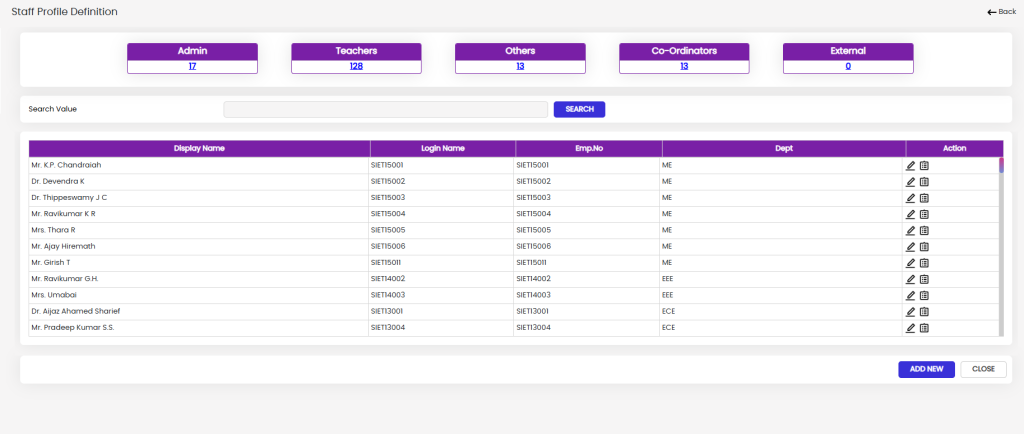
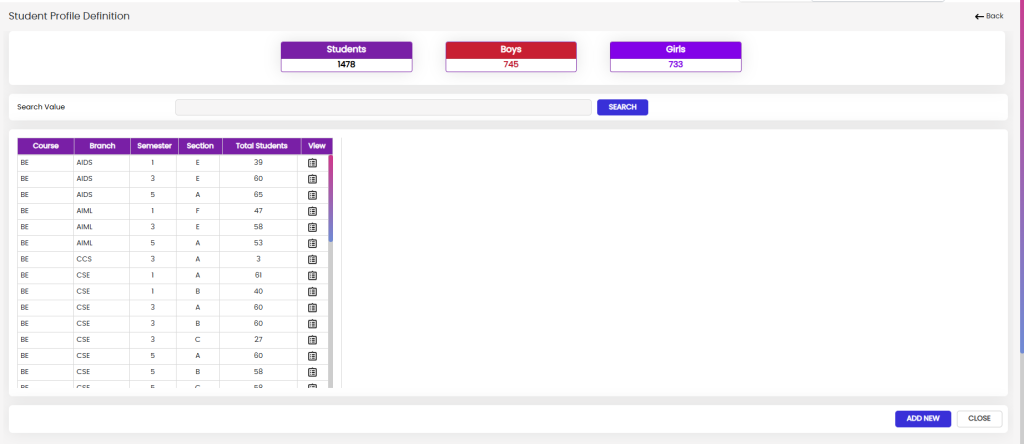
The Student & Staff Profile Management module provides a centralized system for creating, organizing, and managing comprehensive records of faculty, staff, and students within the college ERP. It enables administrators to maintain essential personal, academic, employment, admission, departmental, family, address, document, and login-related information in a structured manner. The module also supports searching, categorizing, viewing, editing, and creating profiles, helping the institution maintain accurate and easily accessible records across different departments and academic groups.
Student Basic Information & Admission Details
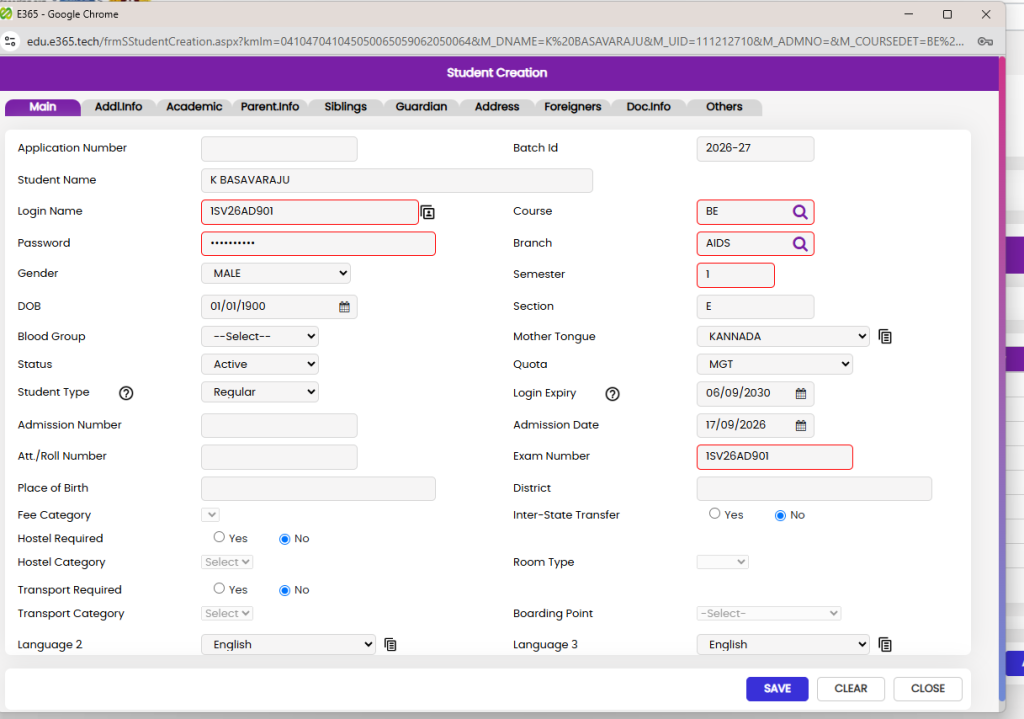
The Student Basic Information & Admission Details section is used to capture and manage the student’s core personal, academic, admission, and institutional information in a structured format. It includes details such as Application Number, Student Name, Login Name, Password, Gender, Date of Birth, Blood Group, Status, Student Type, Admission Number, Roll Number, Place of Birth, Course, Branch, Semester, Section, Batch, Mother Tongue, Quota, Admission Date, Exam Number, District, Fee Category, Hostel, Transport, Room Type, Boarding Point, and Language preferences. The section also allows the institution to specify whether the student requires hostel or transport facilities and whether the student is an inter-state transfer, providing a complete overview of the student’s basic profile and admission-related requirements.

FAQ

Open the e365 ERP login page and enter your authorized username and password. After successful authentication, you can access the modules and features assigned to your account based on your role and permissions.
Yes. An ERP system can provide different modules and access levels for different departments and users. Administrators can configure access according to organizational requirements, allowing each user to work with the functions relevant to their role.
Access to modules, menus, and functions is generally controlled by user roles and permissions. If an option is not visible or accessible, contact your ERP administrator to verify whether the required permission has been assigned to your account.
Yes. e365 ERP can be accessed from supported devices through a web browser, provided the user has valid login credentials and the required access permissions.
Yes. e365 ERP can be accessed from supported devices through a web browser, provided the user has valid login credentials and the required access permissions.